Augmented Reality Actions
Set AR Object Action
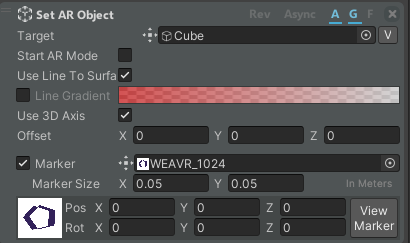
This action works only in Augmented Reality scenes. It allows you to generate an object of your choice after a marker has been framed by the camera.
| Property | Description |
|---|---|
| Target | The object that you want to generate. |
| Start AR Mode | If enabled, your procedure will start in AR. |
| Use Line To Surface | If enabled, your object will be outlined. |
| Line Gradient | If enabled, you can select the gradient color of the outline. |
| Use 3D Axis | Whether to use the 3D Axis for the orientation or not. |
| Offset | The offset to be applied when placing the object. |
| Marker | The marker image to use. |
| Marker Size | The real-world size of the marker. |
| Pos | Position of the object relative to the marker. |
| Rot | Rotation of the object relative to the marker. |
Click on the View Marker button to see the marker inside the scene and edit its position and rotation.