Canvas Actions
The Canvas group contains the following actions: Set Text, Set Image, Play Video.
The Advanced section contains extended versions of the previous actions with more settings to customize: Set Text Expert, Set Image Expert, Play Video Expert.
Set Text

The Set Text action allows you to set the text and color of any text object inside in the scene.
| Property | Function |
|---|---|
| Target | Target TMP text component whose text to change. |
| Text | If enabled, the text can be changed. It can be animated. |
| Color | If enabled, you can customize the color that is applied to the text. It can be animated. |
Set Image
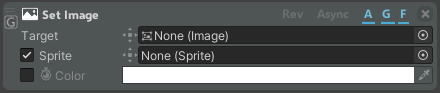
The Set Image action allows you to set the image sprite and color of any image inside a canvas.
| Property | Function |
|---|---|
| Target | Target image component whose image to change. |
| Sprite | If enabled, the image can be changed. It can be animated. |
| Color | If enabled, you can customize the color that is applied to the image. It can be animated. |
Play Video

The Play Video action allows you to set the video to be played on the Video Player of any canvas of the scene.
| Property | Function |
|---|---|
| Player | Video Player to play the video on. |
| Video | Video clip to play. |
| Loop | If enabled, allows playing the video in loop. |
Advanced
Set Text Expert
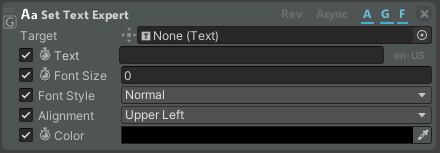
The Set Text Expert action allows you to customize the Text of any Text object inside a canvas in the scene.
| Property | Function |
|---|---|
| Target | Target text component whose text to change. |
| Text | If enabled, the text can be changed. It can be animated. |
| Font Size | If enabled, you can customize the font size of the text. It can be animated. |
| Font Style | If enabled, you can customize the style of the text (i.e., bold, italic, etc.). |
| Alignment | If enabled, you can customize the alignment the text. |
| Color | If enabled, you can customize the color of the text. It can be animated. |
Set Image Expert
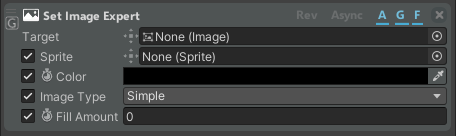
The Set Image Expert action allows you to customize the Image inside a canvas in the scene.
| Property | Function |
|---|---|
| Target | Target image component whose image to change. |
| Sprite | If enabled, the image can be changed. It can be animated. |
| Color | If enabled, you can customize the color that is applied to the image. It can be animated. |
| Image Type | If enabled, allows changing the image type. |
| Fill Amount | If enabled, allows customizing the fill amount of the sprite (if the Image Type property supports filling the sprite). It can be animated. |
Play Video Expert
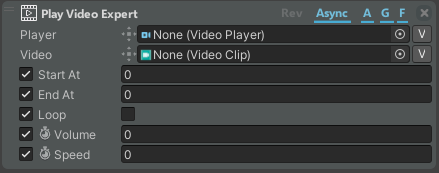
The Play Video Expert action allows you to customize the Video of the Video Player in any canvas in the scene.
| Property | Function |
|---|---|
| Player | Video Player to play the video on. |
| Video | Video clip to play. |
| Start At | Starting point of the video (in sec). The video proper duration should be considered. |
| End At | Ending point of the video (in sec). The video proper duration should be considered. |
| Loop | If enabled, allows playing the video in loop. |
| Volume | If enabled, allows customizing the volume of the audio in a video clip. It can be animated. |
| Speed | If enabled, allows customizing the speed of the video clip. It can be animated. |