WEAVR Procedures — Basic Concepts
A Procedure consists of various steps that determine its execution. Inside WEAVR, a procedure can be a Virtual Training (VT) lesson or an Operations Support (OpS) helper.
Procedures are created by the WEAVR Creator and executed by the WEAVR Player. They can have sequential or parallel execution, can be shared by multiple users, and can alter execution based on user input.
A procedure is designed to be self-contained, which means it can store all its assets with it, but it also can get external data during the runtime.
Procedure Structure
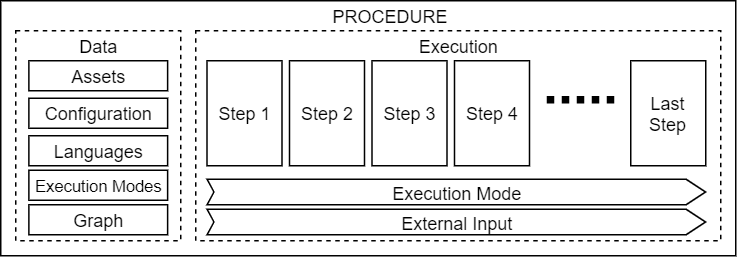
A standard procedure has the following structure:
| Element | Description |
|---|---|
| Assets | Assets needed for execution (audio files, images, etc.) |
| Configuration | Describes how and where the procedure can be executed, along with additional data used by the WEAVR Player |
| Languages | Languages the procedure supports (converted to speech). You can define languages when creating a procedure (in Procedure Wizard) or while configuring procedure steps (in Procedure Inspector) |
| Execution Modes | Define the type of mode (Automatic, Guided, or Feedback) and how it should be executed by the procedure |
| Graph | Contains the steps and navigation among steps |
Procedure Configurations
Since the procedures can be anything from VT lessons to automatic execution systems, the WEAVR Player needs a way to know how to execute, and if it can execute the procedure. The configurations are used to determine the type of the procedure. These configurations can be customized, and new ones can be created.
| Configuration | Use Case |
|---|---|
| Virtual Training | Used for VT lessons. Usually allows user navigation and interaction with virtual objects |
| Operations Support | Used as supportive media to accomplish various field operations (e.g., technical assistance for maintenance workers). Usually does not allow user navigation in the virtual worlds and allows the user to interact only with User Interface (UI) elements |
WEAVR Creator has a quite modular system for the procedure configurations allowing an expert user to extend existing configurations or create new ones without a line of code.
Procedure Execution Modes
The Execution Modes are at the core of a procedure execution and, together with a procedure configuration, define the procedure type. An execution mode directs the WEAVR Player which steps to execute, what to execute in every step, and how to execute it. Like configurations, execution modes are extendable, or even new ones can be created or deleted by an expert user without any coding knowledge.
The OpS configuration, by default, has only one execution mode, while the VT configuration has a set of three execution modes: Automatic, Guided, Feedback.
Automatic Execution Mode
This mode is designed to be managed and executed entirely by the WEAVR Player with the minimal user interaction (move back and forth between steps). It is usually used to show the user how the entire procedure should be performed (e.g., for a student to learn a lesson). It involves predetermined camera movements, an automatic object interaction, automatically triggered animations, informative audios, videos, images, and texts, as well as object highlighting. The only interactions allowed by the user are to navigate between procedure steps, either to skip or replay them.
This mode is not always available for execution; for example, in VR environments, it is rarely used because there are features not suited for VR (e.g., automatic camera movement can cause nausea). It is the task of the designer of the procedure to make sure that the procedure automatically executes the steps.
Guided Execution Mode
This mode is designed to help the user perform and complete a procedure. It allows the user to freely navigate the virtual world and to interact with virtual objects. It has various helpers for the user ranging from guiding informative audios (instructor voice), billboards, images, videos, object highlighting, animations, world navigation guidance, etc.
While the user can navigate the world, the interaction with objects is limited by the step requirements; for example, if the step requires the user to press the button X, only button X is interactive during that step. By default, unlike Automatic mode, this mode does not allow navigating steps (mainly because of physics states), however, this logic can be activated if it is needed.
Feedback Execution Mode
This mode is designed to evaluate the user ability to perform the procedure (as an exam for a maintenance student). This mode does not have any helpers to guide the user, thus the user must figure out himself what to do. The only feedback for a user is whether a step has been completed or not.
The user can navigate freely throughout the entire virtual environment and interact with objects. It is up to the procedure designer to put constraints on which objects can be interacted with during each step.
By default, this mode allows a user to request help, which invokes some helpers defined for other execution modes (e.g., Automatic or Guided). This is useful when the user is blocked and cannot proceed. However, it also can be used to penalize the user and lower its final score. This functionality can be easily disabled if not needed.
Like Guided mode, the Feedback mode, by default, does not allow navigating steps, but it can be enabled if needed.