Catalogues
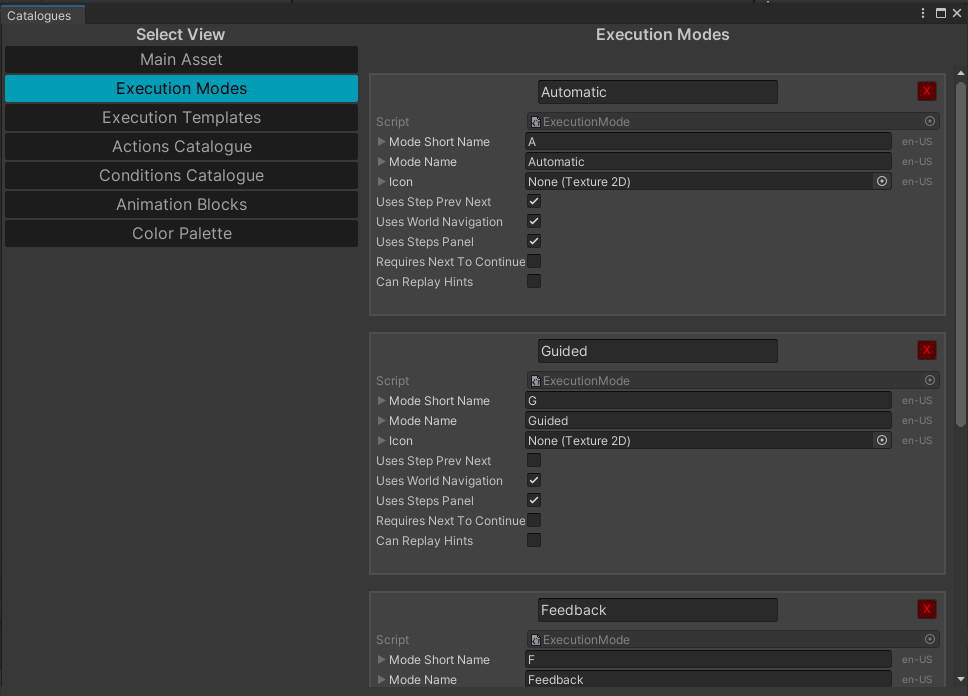
The WEAVR Catalogue, that you can find in WEAVR > Catalogues, contains all the actions, conditions, and other settings that you can customize. These assets are stored inside the Asset\WeavrData\Catalogues folder.
Each section contains different properties of the WEAVR that can be changed. In each one it is possible to add or modify the configurations already present.
The catalogue contains the following sections:
- Main Asset — it contains the default structures that manage the actions, conditions, and various configurations of the WEAVR.
- Execution Modes — here you can find all the execution modes of your procedures. You can create new ones, remove them, edit them.
- Execution Templates — the configuration type of your procedures. You can add new ones, remove them, or edit them.
- Actions\Conditions Catalogue — here are stored all the actions and conditions inside the WEAVR. You can customize them by adding new ones, remove them or edit them. You can organize them in groups.
- Animation Blocks — here you can edit and create new animation blocks that will be used by the Animations action.
Actions\Conditions Catalogue
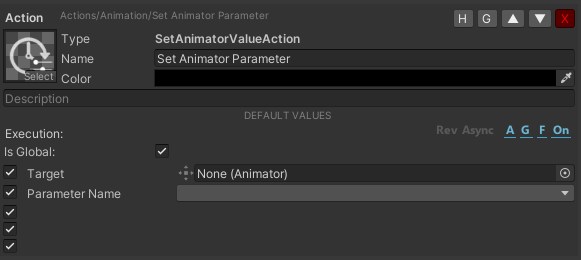
You can edit a lot of different features for your action or condition. You can move it inside the list with the up/down arrows; you can hide them with the H button and group them with the G button.
Your custom assets do not appear in the folder immediately after creating them, but you can still edit them from the Catalogue. After restarting Unity, you can find them inside the proper folder.