Score System
Go to WEAVR > Procedures > Score System (or click Score in the Procedure Editor toolbar).
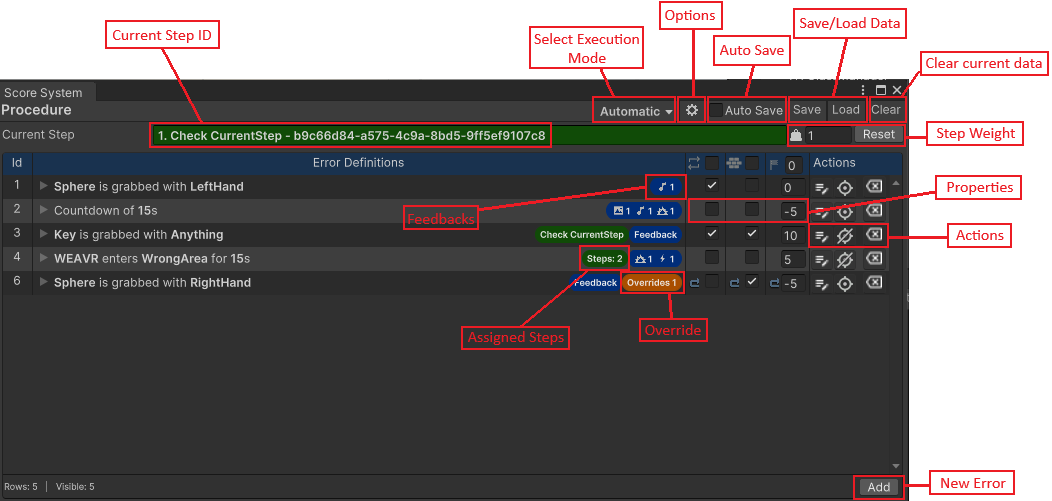
You can define a score system for your procedures. This allows you to evaluate the user based on the score that he has reached at the end of the training. Every procedure can have multiple score definitions that can be assigned to different execution modes.
Score Data are stored inside your project in Assets > Procedures > ScoreData.
Error Types
You can define the following types of Errors:
| Error Type | Description |
|---|---|
| Area Error | Define if an object can enter/exit an area |
| Grab Error | Define if an object can be grabbed |
| Interaction Error | Define if an interaction is error or not |
| Timing Error | Define a timer for the procedure |
| Look at Error | Define if the source object can look or not at the target object |
| Integrity Question Error | Make a quiz like question |
Error Properties
Every error, in addition to its specific properties, has common characteristics:
| Property | Description |
|---|---|
| Repeatable | Can be committed several times |
| Blocking | The execution of the specified action is prevented |
| Points | The points assigned to the error |
Feedbacks
Each error can have Feedbacks, which can be visual (textures, effects), audio, or generic events.
Local Errors
The error can be linked to one or more steps making it a Local error, i.e. it is only checked during the specified steps.
Overrides
Overrides can be defined for each error, i.e. more specific cases of it.
For example, with an error of type interaction: "Every executable is an error". By creating an override of this you can define that in step 2 "only the executable on the key object is an error", or you can specify another score for a specific executable.
Score Options

| Field | Description |
|---|---|
| Pass Score | The minimum score to pass the training |
| Step Points | Points related to each step inside the procedure |
| Auto Hide Columns | Hide columns when the window is too small |
| Filter by step | Hide errors not related to the current selected step |