Object Actions
The Object group contains the following actions: Toggle Object, Toggle Component, Toggle All Components, Lock Object Movement, Set Generic Value, Set Material, Set Color and Texture, Call Method, Control Particle System, Object Reposition, Remove Object Reposition, Create Ghost, Toggle Ghost.
Toggle Object

The Toggle Object action enables or disables the target GameObject in a scene.
| Property | Description |
|---|---|
| Target | Target object to show or hide |
| Show | If enabled, shows the object. It can be animated. |
Toggle Component

The Toggle Component enables or disables the indicated component of the target object.
| Property | Description |
|---|---|
| Target | Target object |
| Component | Component to enable/disable |
| Enable | If enabled, activates the component |
Toggle All Components
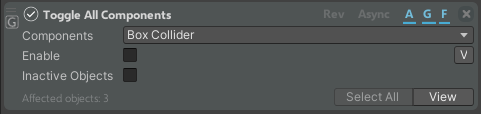
With the Toggle All Components action, you can enable or disable a chosen component across all game objects that possess it. Objects of all the scenes are considered.
| Property | Description |
|---|---|
| Components | Select the component |
| Enable | If enabled, activates the component |
| Inactive Objects | If enabled, the inactive objects are considered as well |
| View | View the affected objects inside the Hierarchy |
| Select All | Select the affected objects inside the Hierarchy |
Lock Object Movement
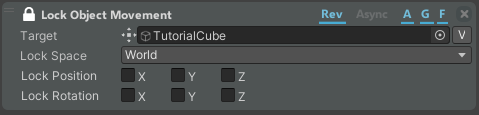
The Lock Object Movement locks the movement of the target object.
| Property | Description |
|---|---|
| Target | The object whose movement you want to block |
| Lock Space | The space in which the movement is blocked (Local or World) |
| Lock Position | Lock translation on the selected axis |
| Lock Rotation | Lock rotation on the selected axis |
Set Generic Value

The Set Generic Value action sets different attribute values of the target object. The values are property of the component of the target object.
| Property | Description |
|---|---|
| Target | The object whose property you want to change |
| Property | The property that you want to change |
| Value | Depends on the type of property that you choose |
Set Material

The Set Material action sets the material of the target object.
| Property | Description |
|---|---|
| Target | The object whose material you want to change |
| Material | The material to be applied to the target object. It can be animated. |
Set Color and Texture
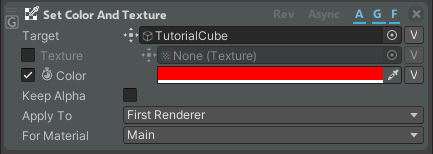
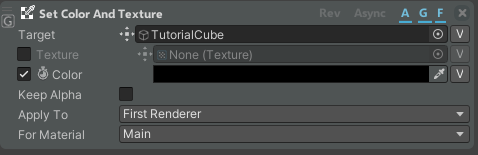
The Set Color and Texture action sets the color, texture, or both target object.
| Property | Description |
|---|---|
| Target | Define the renderer for which to change the color, texture, or both |
| Texture | If enabled, you can change the texture of the target renderer |
| Color | If enabled, you can change the color of the target object. It can be animated. |
| Keep Alpha | If enabled, it will keep the alpha property of the object |
| Apply To | If you want to change the first renderer, the first level children or all the children |
| For Material | If your target has more than one material, you can choose how many of them will be changed |
Call Method

The Call Method action expands the Set Generic Value actions by calling the methods of the Target component.
| Property | Description |
|---|---|
| Target | Define the target object |
| Method | The method that you want to call |
Control Particle System
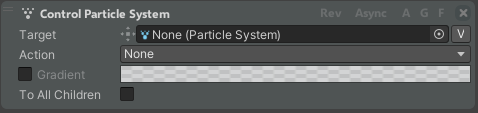
The Control Particle System action allows you to control a particle system inside the scene.
| Property | Description |
|---|---|
| Target | The target particle system |
| Action | Whether you want to play, pause, stop your system |
| Gradient | If enabled, you can set a color gradient for your system |
| To All Children | Applies the changes to all the children of the particle system |
Object Reposition
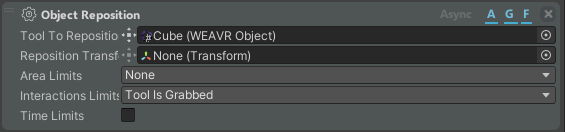
This action allows you to reposition the target object.
| Property | Description |
|---|---|
| Tool to Reposition | The Object to be repositioned |
| Reposition Transfer | The Transform where the object should be repositioned |
| Area Limits | Whether to check if the object should be inside or outside an area |
| Interaction Limits | Reposition the object if the object is grabbed or not |
| Time Limits | The time to wait before the object is repositioned |
Remove Object Reposition

This action allows you to remove the object reposition system.
| Property | Description |
|---|---|
| Remove Options | Remove last or all controllers added in the scene |
Create Ghost
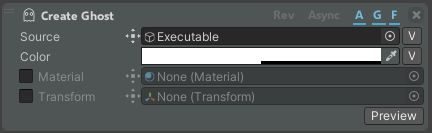
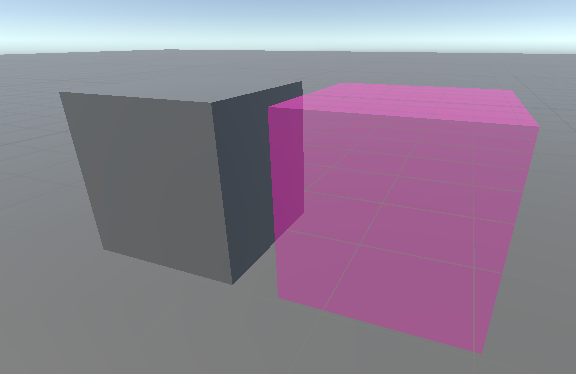
This action allows you to create a ghost copy of the source object.
| Property | Description |
|---|---|
| Source | The source object to be copied |
| Color | Color of the ghost |
| Material | If enabled, change ghost material |
| Transform | If enabled, set the start transform of the ghost |
Toggle Ghost

This action allows you to show or hide a ghost.
| Property | Description |
|---|---|
| Ghost | The ghost you want to show/hide (list of actions) |
| Show | Show/Hide ghost |
Advanced
The advanced section contains some of the previous actions with more settings to customize.
Set Color and Texture Expert
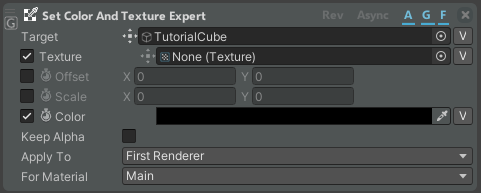
The Set Color and Texture Expert action allows you to customize the color and texture of the target object.
| Property | Description |
|---|---|
| Target | Define the renderer for which to change the color, texture, or both |
| Texture | If enabled, you can change the texture of the target renderer |
| Offset | If enabled, applies the offset to the main texture of the target renderer. It can be animated. |
| Scale | If enabled, applies the scale to the main texture of the target renderer. It can be animated. |
| Color | If enabled, you can change the color of the target object. It can be animated. |
| Keep Alpha | If enabled, keeps the alpha property of the object |
| Apply To | If you want to change the first renderer, the first level children or all the children |
| For Material | If your target has more than one material, you can choose how many of them will be changed |