Animation Actions
Animations Action
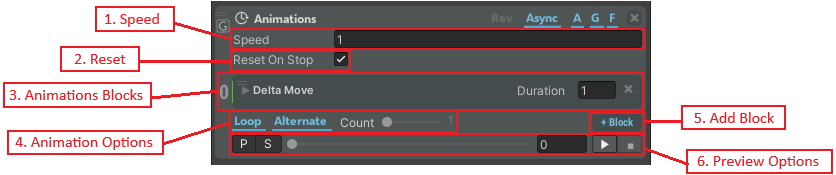
The Animations Action plays an animation on a target. It supports one or more Animation Blocks that can be combined to create complex animations.
Top-Level Properties
| Property | Description |
|---|---|
| Speed | Speed of the whole animation (in m/s). |
| Reset | Reset the animation at the end of it. |
| Animations | List of animation blocks with numbers. |
| Animation Options | Define the number of times and the modality the whole animation is played. Loop = when highlighted, the animation is played in a loop according to the following settings: Alternate = if highlighted, the animation is reproduced alternately forward and backward. Count = the animation is reproduced the indicated number of times. If you move the slider to the rightmost position, the animation will be reproduced infinite times. |
| Add Block | Creates a new Animation Block. |
| Preview Options | Preview the animation in the scene without entering the Play mode. The options are as follows: P = if clicked, the preview of the whole animation can be visualized in the scene. S = if clicked, the directions, step numbers, transforms, etc. of the Animation Blocks appears in the scene and can be set directly in the scene. Slider = moves to a particular point of the animation. Play\Stop = play\stop the animation. |
Track System
The Animations block allows you to create an animation that can involve one or more simple animations, using the available Animation Blocks.
Each Animation Block has a Track number. Animations blocks that have the same track can be played in a sequence (one after the other), while Animations blocks with different tracks can be played simultaneously. The blocks with the same track number are highlighted with the same color to the left of the block.
Wait
The Wait block allows you to set a waiting time before continuing with step actions.

| Property | Description |
|---|---|
| Duration | Displays the duration of the wait block (in sec.). |
| Curve | Displays the block animation curve. |
| Track | Displays the track number of the Animation block. Animations blocks that have the same track can be played in a sequence or one after the other, while Animations blocks with different tracks can be played simultaneously. The blocks with the same track number are highlighted with the same color to the left of the block. |
Delta Move
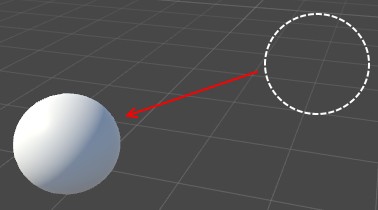
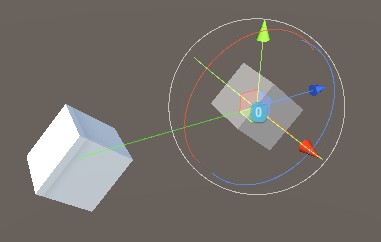
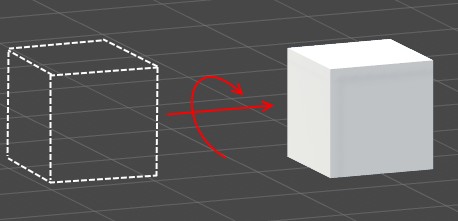
The Delta Move block allows you to set a free delta movement of an object, translation, rotation, and scale of the object.
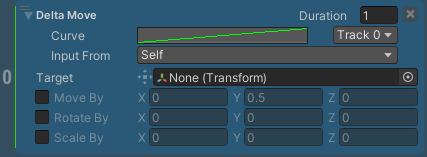
| Property | Description |
|---|---|
| Duration | Displays the duration of the wait block (in sec.). |
| Curve | Displays the block animation curve. |
| Track | Displays the track number of the Animation block (see Wait animation). |
| Input From | References the block target in different ways according to the indicated setting: Self = the target is set manually and individually. From Previous = the target is set automatically according to the previous block target, no matter of the track number. From Previous in Track = the target is set automatically according to the previous block target having the same track. From Block Index = the target is set automatically according to the block number indicated (a number list appears to the right of the setting). |
| Target | Object to animate. |
| Move By | Set the translation deltas. |
| Rotate By | Set the rotation deltas. |
| Scale By | Set the scale deltas. |
Move to Target
The Move to Target block allows you to set the final position of the target towards another existent object transform in the scene.
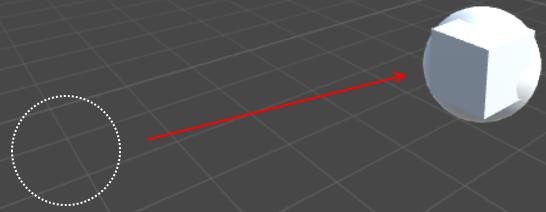
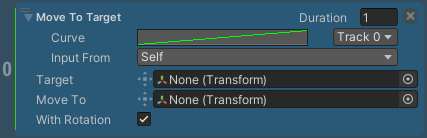
| Property | Description |
|---|---|
| Duration | Displays the duration of the wait block (in sec.). |
| Curve | Displays the block animation curve. |
| Track | Displays the track number of the Animation block (see Wait animation). |
| Input From | References the block target in different ways according to the indicated settings (see Delta Move animation). |
| Target | Object to animate. |
| Move To | Set the destination of the target. |
| With Rotation | If enabled, the rotation of the object that will move matches the orientation of the destination transform. |
Change Color and Texture
The Change Color and Texture block allows you to set the color and/or texture of the target object. This animation is related to the individual Set Color and Texture action.
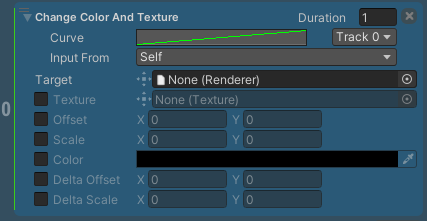
| Property | Description |
|---|---|
| Duration | Displays the duration of the wait block (in sec.). |
| Curve | Displays the block animation curve. |
| Track | Displays the track number of the Animation block (see Wait animation). |
| Input From | References the block target in different ways according to the indicated settings (see Delta Move animation). |
| Target | Renderer component of the object to animate. |
| Texture | If enabled, allows changing the texture of the target renderer. |
| Offset | If enabled, allows defining the offset to be applied to the main texture of the target renderer. |
| Scale | If enabled, allows defining the scale to be applied to the main texture of the target renderer. |
| Color | If enabled, allows selecting the color of the target. |
| Delta Offset | If enabled, allows defining the delta offset to be applied to the main texture of the target renderer (only if offset is disabled). |
| Delta Scale | If enabled, allows defining the delta scale to be applied to the main texture of the target renderer (only if scale is disabled). |
Change Material
The Change Material block allows you to set the material of the target object. This animation is related to the individual Set Material action.
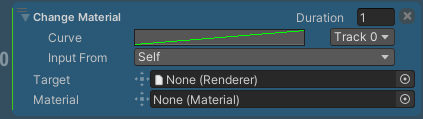
| Property | Description |
|---|---|
| Duration | Displays the duration of the wait block (in sec.). |
| Curve | Displays the block animation curve. |
| Track | Displays the track number of the Animation block (see Wait animation). |
| Input From | References the block target in different ways according to the indicated settings (see Delta Move animation). |
| Target | Renderer component of the object to animate. |
| Material | Material to be applied to the object. |
Change Transparency
The Change Transparency block allows you to set the transparency of the object.
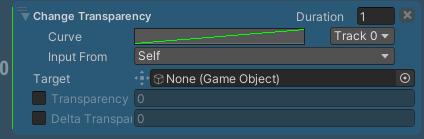
| Property | Description |
|---|---|
| Duration | Displays the duration of the wait block (in sec.). |
| Curve | Displays the block animation curve. |
| Track | Displays the track number of the Animation block (see Wait animation). |
| Input From | References the block target in different ways according to the indicated settings (see Delta Move animation). |
| Target | Object to animate. |
| Transparency | If enabled, the transparency of the object can be set. The value goes from 0 to 1, where 0 is invisible, and 1 is fully visible. |
| Delta Transparency | If enabled, the delta transparency of the object can be set. The value goes from 0 to 1, where 0 is invisible, and 1 is fully visible. Delta Transparency cannot be defined if Transparency is enabled. |
Play Animation Clip
The Play Animation Clip block allows you to assign an Animation Clip to the target object. This animation is related to the individual Play Animation Clip action.
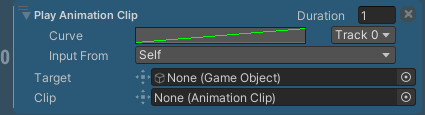
| Property | Description |
|---|---|
| Duration | Displays the duration of the wait block (in sec.). |
| Curve | Displays the block animation curve. |
| Track | Displays the track number of the Animation block (see Wait animation). |
| Input From | References the block target in different ways according to the indicated settings (see Delta Move animation). |
| Target | Object to animate. |
| Clip | Clip to be played. |
Play Audio
The Play Audio block plays the indicated audio on the background of the scene. This animation is related to the individual Play Audio action.
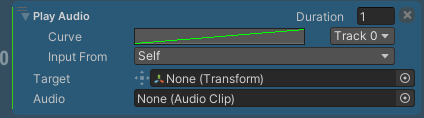
| Property | Description |
|---|---|
| Duration | Displays the duration of the wait block (in sec.). |
| Curve | Displays the block animation curve. |
| Track | Displays the track number of the Animation block (see Wait animation). |
| Input From | References the block target in different ways according to the indicated settings (see Delta Move animation). |
| Target | Object to animate. |
| Audio | Audio to be played. |
Set Animator Parameter Action
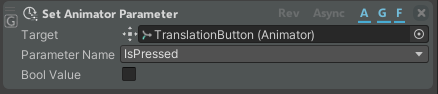
The Set Animator Parameter action allows you to set the defined Parameter value of the target Animator.
| Property | Description |
|---|---|
| Target | Defines the Animator where to set the Parameter. |
| Parameter Name | Parameter to set. |
| Value | If enabled, sets the bool, float, or other value according to the Parameter type. |
Play Animation Clip Action
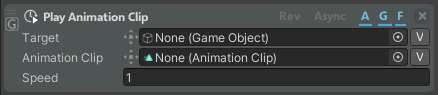
The Play Animation Clip action allows you to assign an Animation Clip to the target object.
| Property | Description |
|---|---|
| Target | Object to be animated by the Animator. |
| Animation Clip | Clip to be played. |
| Speed | How fast the animation will be played. The negative value plays the animation backwards. |
Set Animator State Action
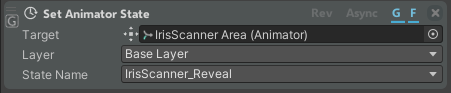
The Set Animator State action allows you to set the current Animator State.
| Property | Description |
|---|---|
| Target | Target Animator. |
| Layer | Layer of the target animator. |
| State Name | Animator state to be set as a target. |
Animator Controls Action

The Animator Controls action allows you to control your animation during procedure.
| Property | Description |
|---|---|
| Animator | Target Animator. |
| Command | Command you want to give to the animation. |