Groups
These components let you enable/disable a group of other components.
In this section you will learn about the following components:
- Animator Group
- Group Activator
- On Enable Event
- Random Activator
- Component Activator
Animator Group
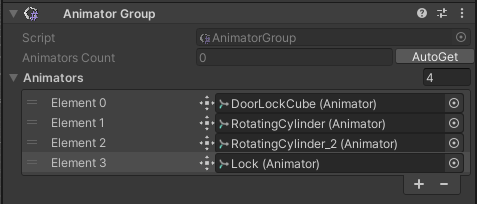
The Animator Group component allows you to control all animators listed within one action by a component event or a procedure action.
| Property | Function |
|---|---|
| Autoget | If clicked, the children's Animator components are added to the list of Animators. |
| Animators | List of controlled animators. |
Group Activator
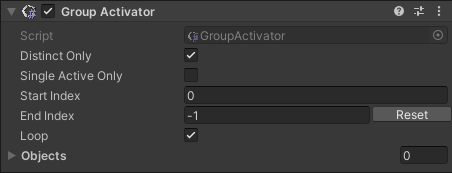
The Group Activator component controls a list of GameObjects that will be enabled in a scene one at a time (by event or procedure). The active GameObject can be called directly, or by following the list order in a cycle.
| Property | Function |
|---|---|
| Distinct Only | If enabled, GameObjects cannot be listed more than once. |
| Single Active Only | If true, will return a negative index of the active object if there are more than one active at the same time. |
| Start Index | The first Element number of the list that is considered when using the GameObject cycling activation. |
| End Index | The last Element number of the list that is considered when using the GameObject cycling activation. |
| Reset | To reset to the total number of objects inside the list. |
| Loop | If enabled, the end index element is followed by the first index element, starting all over again the loop. |
| Objects | List of GameObjects inside the group. |
On Enable Event
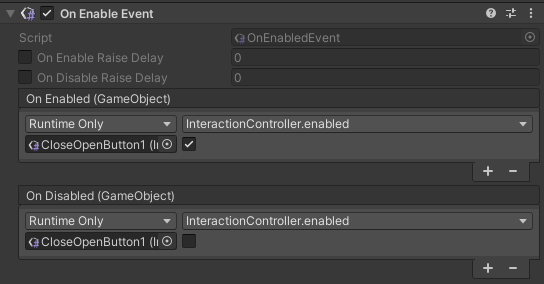
The On Enable Event component triggers required Events whenever the GameObject is enabled or disabled.
| Property | Function |
|---|---|
| On Enable Raise Delay | If checked, the defined delay [sec] is erased before triggering the event. |
| On Disable Raise Delay | If checked, the defined delay [sec] is erased before triggering the event. |
Random Activator
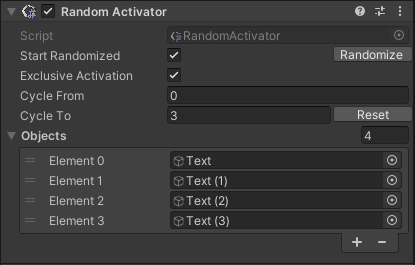
The Random Activator component randomly activates one listed GameObject, as well as enables one GameObject at a time by following the list order in a cycle.
| Property | Function |
|---|---|
| Start Randomized | If enabled, one GameObject in the list is activated randomly when the game is On Play, or the component is activated. |
| Randomize | Choose a random element to activate from the Objects list. |
| Exclusive Activation | If enabled, all GameObjects in the list that were not activated randomly are disabled. |
| Cycle From | The first Element number of the list that is considered when using the GameObject cycling activation. |
| Cycle To | The last Element number of the list that is considered when using the GameObject cycling activation. |
| Reset | To reset to the total number of objects inside the list. |
| Objects | List of GameObjects inside the group. |
Component Activator
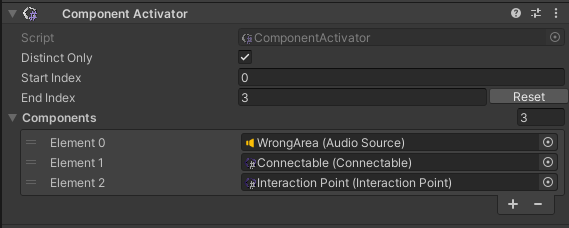
The Component Activator component controls a list of Components that will be enabled in a scene one at a time (by event or procedure). The active Components can be called directly, or by following the list order in a cycle.
| Property | Function |
|---|---|
| Distinct Only | If enabled, Components cannot be listed more than once. |
| Start Index | The first Element number of the list that is considered when using the Component cycling activation. |
| End Index | The last Element number of the list that is considered when using the Component cycling activation. |
| Reset | To reset to the total number of objects inside the list. |
| Objects | List of Components inside the group. |