Control Flow Conditions
Condition Valid For

Condition Valid For is a container for Exit Conditions that should persist for a certain duration before changing the step.
| Property | Function |
|---|---|
| Validation Time | Define for how long (in sec.) the conditions should be valid before changing the step. |
| Progressive | If highlighted, the condition slowly resets its progress to 0 when the condition child is false. |
| [+] | Add condition to the list. |
Is Execution Mode Condition

Checks the current procedure execution mode.
| Property | Function |
|---|---|
| Mode | Select the execution mode that you want to check. |
On Previous

The On Previous condition checks if the Back button of the WEAVR UI is pressed, when in an OpS procedure.
Procedure Button Pressed

The Procedure Button Pressed condition checks if a UI button of the procedure is pressed.
| Property | Function |
|---|---|
| Button ID | The button that you want to check. The list contains all the buttons inside the button tab of the Procedure graph. |
Procedure Button State
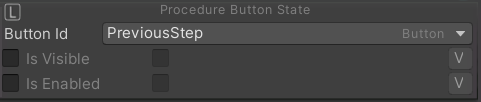
The Procedure Button State condition checks the state of the selected button.
| Property | Function |
|---|---|
| Button ID | The button that you want to check. The list contains all the buttons inside the button tab of the Procedure graph. |
| Is Visible | If enabled, checks if the button is visible. |
| Is Enabled | If enabled, checks if the button is active. |
Procedure Toggle State Changed

The Procedure Toggle State Changed condition checks if the state of the selected toggle is changed.
| Property | Function |
|---|---|
| Toggle ID | The toggle that you want to check. The list contains all the toggle inside the button tab of the Procedure graph. |
Procedure Toggle State
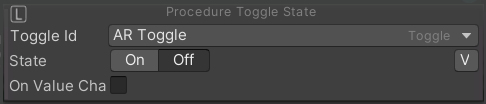
The Procedure Toggle State condition checks if state of the selected toggle.
| Property | Function |
|---|---|
| Toggle ID | The toggle that you want to check. The list contains all the toggle inside the button tab of the Procedure graph. |
| State | Checks if the state is On\Off |
| On Value Changed | If enabled, the condition will be true at any value change of this toggle. |
Event Raised

The Event Raised condition checks if a specific event has been raised.
| Property | Function |
|---|---|
| On Event | The event that you want to check. The list contains all the events inside the event tab of the Procedure graph. |
| From Source | If enabled, allows to check events from components of the set object. |
Player UI Component Changed

The Player UI Component Changed condition checks the state of a WEAVR Player UI component.
| Property | Function |
|---|---|
| Component Game Object | The UI player component that you want to change state. Go to the Player tab in the Procedure Graph Toolbar to take a look at the components inside this list. |
| Is Visible | If enabled, the UI component is visible. |
| Is Interactable | If enabled, the UI component is interactable. |
Error Committed

The Error Committed condition checks if the specified error is committed.
| Property | Function |
|---|---|
| Mode | The execution mode |
| Error | The error to check. |
Waiting Time
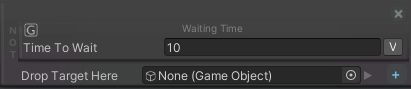
The Waiting Time condition checks that the specified amount of time has passed before proceeding to the next step of the procedure.
| Property | Function |
|---|---|
| Time to wait | Amount of time to wait |