WEAVR Player
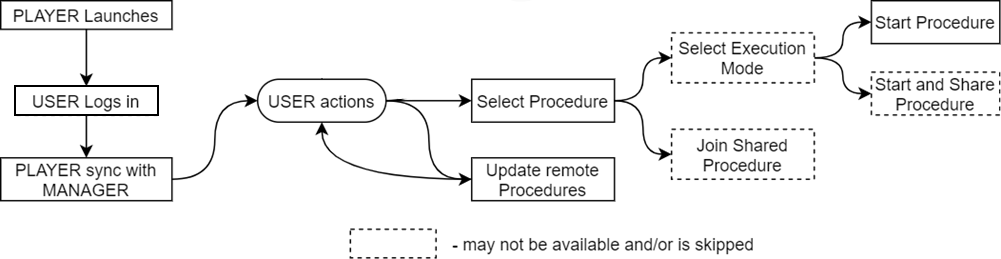
The WEAVR Player enables users to access, select, and execute the available procedures in different modalities.
WEAVR Player is available across various systems including desktop PC, mobile and VR devices, such as HTC VIVE, Oculus, and Microsoft HoloLens.
The Player needs to connect to WEAVR Manager through a login process to update the state of its existing procedures and/or download new procedures. The Player also allows sharing a procedure between multiple students.
The WEAVR Player can be classified into three types:
- VR Virtual Training (VR-VT) — the VR Player handles only Virtual Training procedures, and only in Guided or Feedback modes (Automatic mode or OpS can cause motion sickness due to automatic camera movement). Navigation is performed by physical movement or by a teleportation mechanism, while interactions are performed by virtually touching the interactive objects and pressing the relative buttons on the device controllers.
- Non-VR Virtual Training (VT) — the Non-VR Player can execute any Virtual Training procedure in any mode (Automatic, Guided, Feedback). It is loosely based on First Person (FP) mechanics to navigate the world; interaction is handled by point-and-click for Guided and Feedback modes. In Automatic mode it behaves like an Operations Support procedure, where the user cannot navigate or interact and is just presented with the procedure steps through automatic camera movement and triggered animations.
- Non-VR Operations Support (OpS) — the Non-VR Player can also execute Operations Support procedures. These do not require world navigation or interaction with virtual objects; the user is presented with only a few options: navigation through the procedure (previous and next steps), camera orbiting (rotating the camera around focused objects), and AR functionality (only on supported devices).
Sections
| Page | Description |
|---|---|
| Manager Connection | How to connect to WEAVR Manager and the Player workflow |
| PC and Mobile | PC and mobile Player controls, library, and AR mode |
| Virtual Reality | VR Player controls, HUB room, and library |